
Dagscape

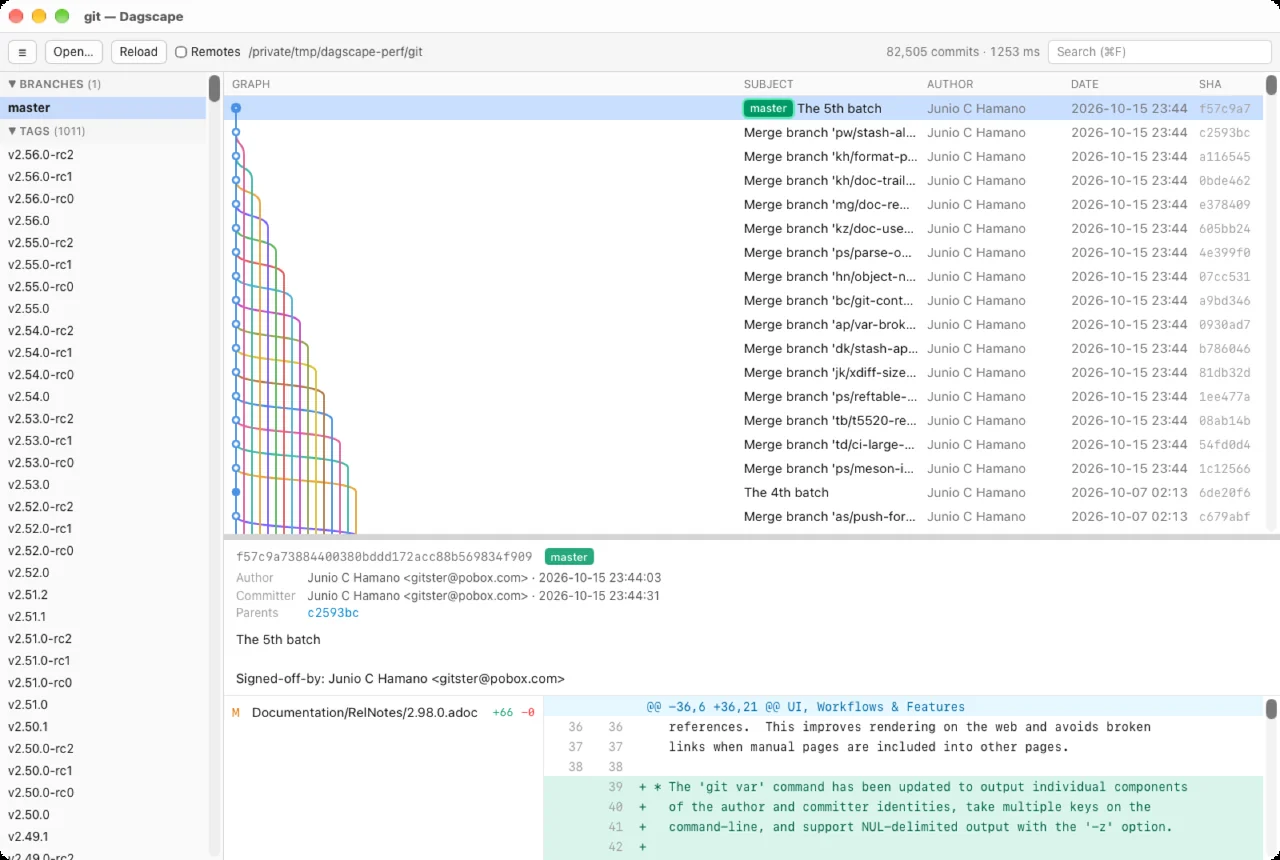
A branch graph browser for Git that shows every branch and tag of a repository in one lane graph.
In the spirit of GitX. Lanes are laid out in Rust and only the visible rows are drawn on a Canvas, so repositories with 100k+ commits scroll smoothly.
Download the latest version
On macOS you can also install it with Homebrew:
brew install --cask cyberneura/tap/dagscapev0.4.0 · 2026-10-21 · Release notes
Supported OS: macOS / Windows
Features
- Every ref (local branches, remote branches, tags, HEAD) is in the graph by default. Remote branches can be hidden with one switch
- Commit details show the message, author and committer, parents (click to jump), changed files with +/- counts, and a unified diff per file. Renames are detected
- Click a branch, remote, or tag in the sidebar to jump to that commit
- Search by subject, author, hash prefix, or ref name
- Reloads automatically when
.git/HEAD,packed-refs, or anything underrefs/changes - Open a repository from the menu, by dropping a folder onto the window, from the recent list, or from the command line (
dagscape /path/to/repo)
Requirements & notes
- The macOS build is a universal dmg, signed and notarized. The Windows build is an NSIS installer.
- On macOS, the command-line tool is installed to
/usr/local/binfrom the menu, Dagscape → Install Command Line Tools…. - Open source under the MIT License.