
Flashcap
Capture, redact, and hand off. A screenshot and annotation tool for macOS and Windows.
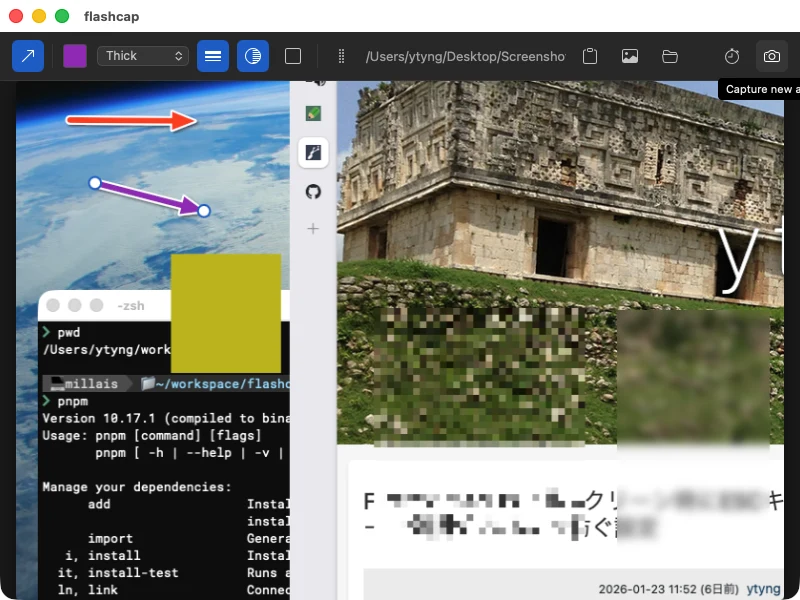
Select a region, draw arrows on the shot, mark areas with rectangles and ellipses, add text, mosaic out what you do not want to share, and drag it straight into Slack. On macOS it can also just read the text off your screen and put it on the clipboard.
Download the latest version
On macOS you can also install it with Homebrew:
brew install --cask cyberneura/tap/flashcapSupported OS: macOS / Windows
Features
- Region-select screenshots, plus timer capture at 3 / 5 / 10 seconds so you can catch open menus and hover states
- Arrow, rectangle, and ellipse annotations (color, thickness, white outline, drop shadow), multi-line text (color, size, bold, italic, white outline, drop shadow), and mosaic / blur / fill masks for hiding personal information before you share, plus cropping
- Drag the finished image straight into Slack, or copy either the image or its file path to the clipboard
- OCR through the macOS Vision Framework (Japanese and English, macOS only). Recognition runs on device, so the image never leaves your machine
- Headless OCR for when you only want the text (macOS only) —
flashcap --capture-screen-textoropen flashcap://ocrruns select, recognize, copy to clipboard, notify, and quit in one shot. Bind it to an Alfred or Raycast hotkey - Screen recording of a selected region, exported to MP4 or animated GIF (trim, fps, and size; macOS only)
Requirements & notes
- The macOS build is a universal binary (Intel / Apple Silicon), signed with a Developer ID certificate and notarized by Apple, so Gatekeeper does not warn.
- macOS asks for Screen Recording permission on your first capture (System Settings → Privacy & Security → Screen Recording).
- On macOS, OCR uses
/usr/bin/swiftfrom the Xcode Command Line Tools; runxcode-select --installif it fails. Exporting video requires ffmpeg. - The Windows build is an x64 installer. It is not code signed, so SmartScreen shows a warning — choose "More info" then "Run anyway".
- On Windows, a capture freezes the monitor under the mouse cursor and lets you drag a rectangle on it. Press Enter to take the whole monitor, Esc or right-click to cancel. Only the monitor under the cursor can be selected from.
- The Windows build has no screen recording, OCR, shell commands, or notifications, and cannot open HEIC / HEIF images. Shortcuts use Ctrl instead of ⌘.
- Open source under the MIT License.